One statement in. Your whole month, explained.
Othman reads your statement, sorts every transaction, and shows your month in plain language. No account needed.
Reading your statement
This takes about a minute for a full month.
Your month is ready
We sorted your transactions and grouped them by category. Pick up where the analysis left off.
What comes back
Not a spreadsheet. A read on your month.
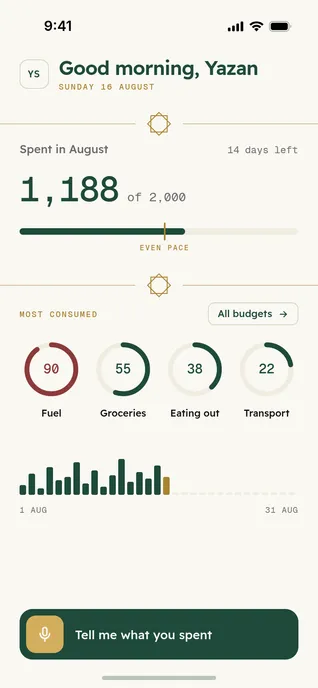
Every line of the statement is matched to a category, a merchant, and a date, then summarised the way a person would say it out loud.
Every transaction, sorted
Groceries, fuel, transfers, subscriptions you forgot about. Each one labelled and totalled.
Where the month went
The four categories that consumed the most, and how the spending was paced across the weeks.
What to do next
A starting budget built from what you actually spend, not from a template.
After the first month, you stop uploading anything.
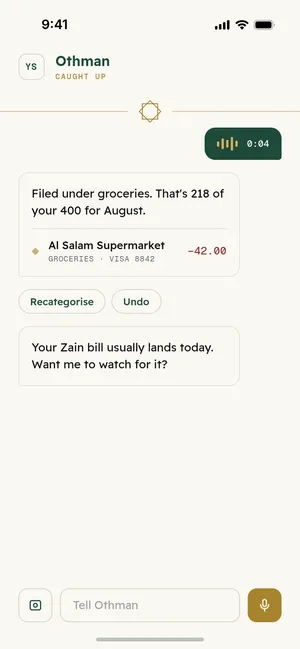
Send a voice note, a photo of a receipt, or a line of text on WhatsApp. Othman writes it into your ledger, in Arabic or English, and answers back in the same language you used.
- Voice notes in Jordanian Arabic
- Receipt photos, including handwritten totals
- Plain text, the way you would tell a friend
Budgets that hold, and a goal to aim at.
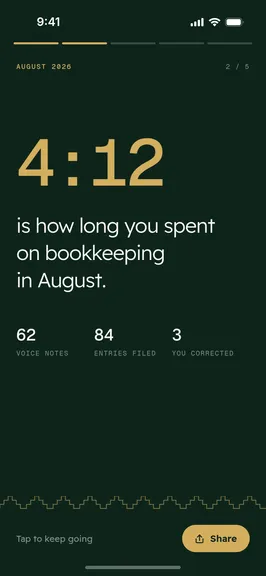
Limits by category with real spend against them, and a monthly recap that tells you what changed.
Budgets by category
Set a limit once. Othman keeps score quietly and only speaks up when a category is genuinely off pace.
One goal at a time
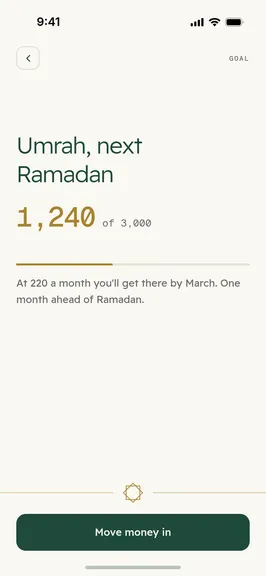
A trip, a deposit, a cushion. Progress is measured against what is left after your real commitments.
Your statement is not our product.
The demo file is parsed in memory and deleted when the analysis finishes. If you create an account, we keep the categorised transactions and nothing else. Othman is not connected to your bank and cannot move money.
Open banking connections are on the roadmap for Jordan. Until then, you bring the file.
Questions
Before you upload
Which banks does this work with?
Any bank that gives you a statement as PDF or CSV. Othman reads the file itself, so there is no integration to wait for.
Who sees my statement?
We do not look at your personal information. The statement is read by the system to pull out the transactions, and nothing else.
Does Othman connect to my bank account?
Not yet. Direct bank connections are coming soon. Until then you bring the file, so there is nothing linked and no access to move money.
Does it work in Arabic?
Yes. Arabic and English are equal throughout, in the analysis, the app, and the chat. Statements in either language parse the same way.
What does it cost?
The statement analysis is free. Paid plans arrive with the full app, and the free tier stays useful.